Content Center
Overview of restaurants, bars, PDF menus, events and guest-facing information.
| Outlet | Type | Service periods | PDF menus | Status |
|---|

One secure workspace for every guest request, resort experience and operational team.
One integrated workspace for guest care, resort content, navigation and live operations.
Live connection with the Guest Worker and KV configuration.
Published changes and automatic backups.
Receive, assign and follow every guest request until it is resolved.
| Request | Guest & location | Department | Priority | Status | Created |
|---|
Choose the email and WhatsApp destination for each type of request. Numbers must include the country code.
Delivery activates when the Cloudflare Worker secrets for the email provider and WhatsApp Cloud API are configured. Requests are always stored in this Hub even if an external notification is unavailable.
Understand every guest experience and activate service recovery immediately.
| Rating | Hotel area | Room | Category | Comment | Status | Email to Guest Relations | Received |
|---|
A privacy conscious view of current stays, preferences and service history.
Only authorized Guest Relations and Front Office users can access stay profiles. Sensitive data never enters the public Guest configuration.
| Guest | Room | Language | Preferences | Arrival | Departure |
|---|
Give each team member only the access required for their work.
| User | Department | Role | Last login | Status |
|---|
Review logins, publishing, user changes, service requests and sensitive actions.
| Time | User | Department | Action | Target |
|---|
Edit markers, guest paths, shuttle routes and stops directly on the production map.
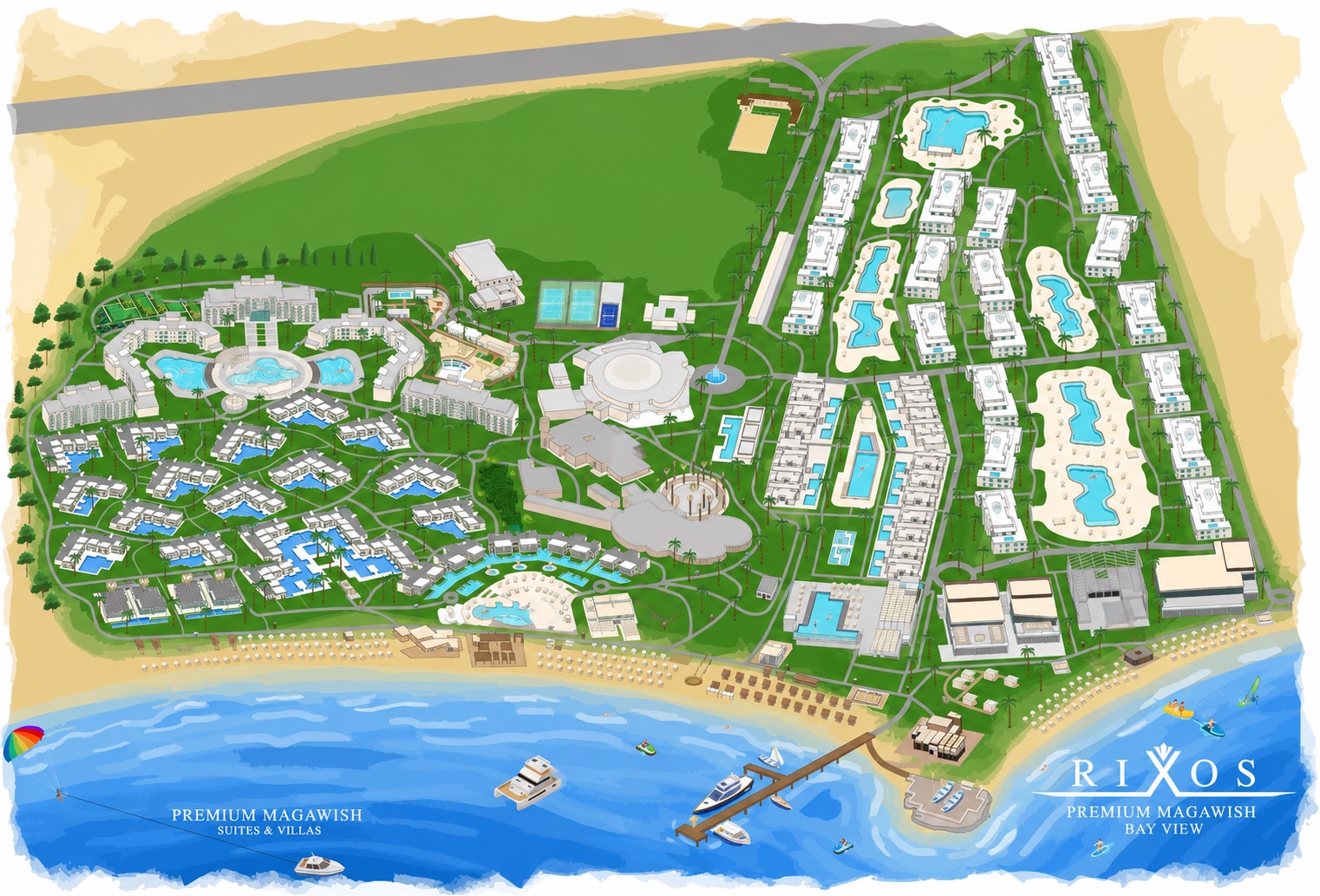
Manage every guest destination and its map position.
| Place | Category | Coordinates | Status |
|---|
Edit the real Guest routing graph with nodes and connections.
Use Map Studio to drag nodes, draw new chains or connect existing nodes.
Create unlimited shuttle lines, configure stops and sequence, assign vehicles, monitor estimated guest demand and keep every stop locked to its route.
Full line control: route, color, direction, hours, frequency, priority and stop sequence.
| Line | Color | Route | Interval | Stops | Status |
|---|
Every line owns an independent ordered stop sequence. The same physical stop may be reused by several lines without sharing its order. Open a stop to calibrate its GPS position.
| Stop | Line | Order | Coordinates | Route lock |
|---|
Physical resort stops are managed once here, then added independently to any shuttle line.
| Physical stop | Used by lines | Coordinates |
|---|
Privacy-safe estimate based on app presence near stops. It indicates potential waiting guests, never a confirmed headcount.
Operational warnings generated from demand, route alignment and fleet availability.
Operational snapshot for line usage, stop concentration and fleet coverage.
Create peak, weekend, event and temporary shuttle schedules without changing the base line.
Operational actions sent by the transport supervisor. Use Dispatch bus for line changes, stop response, standby and return to base.
Structural changes are marked as Draft changes until the main Publish action sends the configuration to Guest and Driver services.
Monitor Android Driver App transmissions and configure each vehicle and assigned line.
| Bus | Line | Status | Driver device | Last update |
|---|
Manage the Guest daily agenda and automatic happening-now notifications.
Import the official seven-day schedule once. The same events appear in Guest Agenda and Kids Club. Existing Rixy records are preserved; reminders are disabled by default to prevent unsolicited alerts. Save & Publish after review.
Edit individual activities using the events table below. To cancel an entire weekly activity, edit its status. Date-specific exceptions are not yet supported.
Extract a weekly agenda, create all six languages, review every entry and publish only after your confirmation.
The original PDF stays in your browser. Existing events, maps, menus and shuttle routes are preserved.
Write each event once in English. CONNECT creates Russian, Arabic, German, French, Turkish and Polish versions. New events and weekly imports enable the 15-minute iPhone reminder by default.
| Event | Schedule | Time | Venue | Status |
|---|
Manage all 1,083 accommodations from one standardized database.
| Room | Building | Floor | Room type | Map connection | Status |
|---|
Connect accommodation buildings to markers, entrances and routing nodes.
| Building | Internal area | Rooms | Marker | Entrance | Route node | Status |
|---|
Overview of restaurants, bars, PDF menus, events and guest-facing information.
| Outlet | Type | Service periods | PDF menus | Status |
|---|
Create photo and video experiences available to all guests or exclusively to Club Privé.
Replace the main Home and Club Privé images directly from your browser.
| Experience | Audience | Price | Media | Status |
|---|
Manage eligible accommodation, exclusive locations and the private communication channel.
Create structured, multilingual menus for restaurants and bars. PDFs remain available as optional references.
| Menu | Meal period | Items | Translated | Status |
|---|
Imported content and automatic translations are always drafts. Kitchen or F&B must approve prices, ingredients and allergens before publishing.
Monitor English, Russian, Arabic, German, French, Turkish and Polish guest content.
Translate existing events, places, experiences and menus into Polish. Review the draft before Save & Publish.
| Content | English | Russian | Arabic | German | French | Turkish | Polish |
|---|
Create operational notices and guest announcements for future Guest integration.
| Title | Audience | Schedule | Status |
|---|
Choose the recipients for Voice of Guest, allergies, dining preferences and accessibility. Verify every address in Cloudflare Email Routing to keep email sending free. After saving this form, click Save & Publish to activate the routing. Blank primary fields use Magawish.GR@accor.com. Up to 10 unique recipients per category.
| Received | Room | Type | Details | Email to Guest Relations | Status |
|---|
Configure the multilingual guest assistant, welcome message and operational knowledge.
Publish the current draft directly to the Guest App.
Blocking validations and warnings are disabled.
Automatic versions retained for 90 days.